Prevent Email Phishing With These Anti-Spam Tips

Ultra-Fast Internet Deals from $49.99/mo — No Contract Required. Check Your Address →
Phishing is a scheme used by cyber criminals to gather your personal information such as online passwords, login credentials, social insurance number, banking information, credit cards and other forms of sensitive information to steal your identity and to make money at your expense. As identified by the RCMP in this helpful email fraud and phishing FAQ emails are often disguised by fraudsters as a business you typically deal with. They can gather your information through deceptive, bogus emails and websites which can be highly sophisticated and look like a legitimate email or link.
Despite being one of the oldest forms of online crime and social engineering-based Internet scams, phishing is still highly pervasive in modern times. According to Verizon’s 2019 Data Breach Investigation Report, 32% of all cyber attacks involved some form of phishing attack. With that being said, let’s explore ways in which you can identify and protect yourself from all kinds of email fraud and identity theft.
Tips for Avoiding Phishing
Check the Email Domain
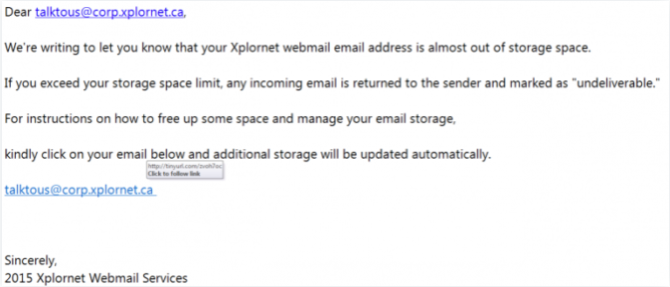
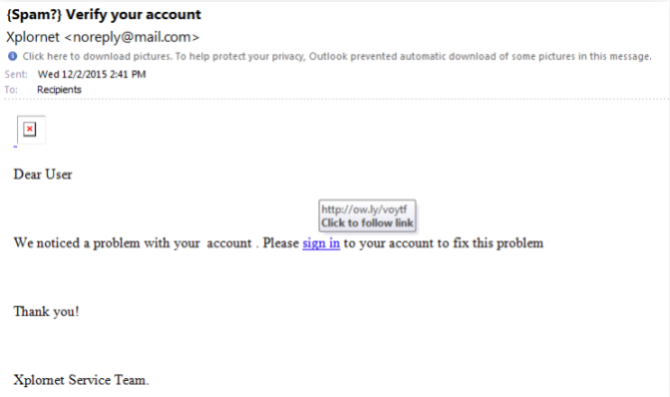
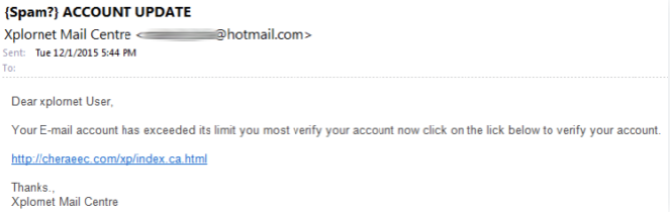
Any legitimate brand or institution contacting you via email will likely have their own unique domain name. If you are receiving emails from a public domain name, such as gmail.com or hotmail.com, chances are it is an impersonation and a fraudulent email. It should be reported to Xplore. If the domain name of the sender seems convincing or legitimate, read it over carefully for unusual abbreviations, symbols and errors. Another tip is to check through your bank statements and other paperwork to find the company in question’s correct email address and domain name, and compare it to the one messaging you. If you find any discrepancies, do not open the email. On mobile phones, often only the display name is shown in an inbox. Be sure to check the address the suspicious email is being sent from prior to opening.
Review Before Clicking Links
Many phishing scams are performed by getting you to click on a link to a malicious website that could potentially be collecting your data and credentials, or by opening spyware or malware (such as viruses or other forms of malicious software) onto your computer. It is important that before clicking on any links, especially from unsolicited emails, you hover your mouse over the link to look at the full link in its entirety. Many times the link is shortened to hide its fraudulent directory. If something looks suspicious at all, do not click on it.
Be Careful with Email Attachments
Many phishing emails attempt to trick recipients into opening attachments that may contain malware, spyware, or other harmful software. Be especially cautious of attachments that you were not expecting, even if they appear to come from a recognizable sender. If an attachment seems unusual or unrelated to the message, avoid opening it until you have verified its legitimacy through another trusted method of communication. Keeping your security software up to date can also help identify potentially dangerous files before they are opened.
Read for Spelling Mistakes
A great deal of phishing emails have spelling mistakes and grammatical errors. Companies and institutions sending you emails are typically done in a formal matter and will have been rigorously proofread before they were sent out. Many believe cyber criminals leave mistakes and intentionally use bad grammar for their scam emails so that they can prey on the most gullible victims. If there are mistakes, be wary of a phishing attempt.
Don’t Believe Urgent Calls to Action
Oftentimes, a fraudulent email will contain aggressive language to scare you into doing what the scammers want in its subject line or content. This includes emails with headers stating your account has been suspended, an urgent payment is needed, or this is your final notice to try and get you to take the bait. Any email message that has a sense of urgency behind it should be back-checked by contacting the company directly through a number you are certain is legitimate, or by searching for it independently online. Do not contact the company using the information provided in the email.
Be Wary of Unexpected Rewards and Offers
Not all phishing attempts rely on fear or urgency. Some emails try to attract attention by claiming you have won a prize, qualified for a special reward, received an unexpected refund, or been selected for an exclusive offer. These messages often encourage immediate action before the opportunity supposedly expires. If an offer seems unusually generous or unexpected, take the time to verify it independently before providing personal information, clicking links, or downloading files. A healthy dose of skepticism can help protect you from scams designed to appear too good to pass up.
Always Be Sceptical
Phishing con-artists have had lots of time to perfect their schemes and social engineering techniques. Logos, email addresses, and the language used in these phony email scams may appear legitimate and reputable despite being spoofs. Always remain skeptical of all emails to ensure that you do not fall victim to a phishing scam.
Ongoing Protection from Phishing
Always use up-to-date security and antivirus software on your device and ensure you are scanning for malware at frequent intervals.
Use multi-factor authentication on your devices such as a thumbprint scan and unique, sentence-long passwords.
Avoid having your email address or phone number visible on social media accounts and other sites.
Check your personal and financial accounts regularly for any unauthorized or suspicious activity. Always stay on-guard against being compromised.
Keep your data backed-up to an external hard drive, not connected to the internet, at all times.
If you’ve received a phishing email, we encourage you to report it to us at [email protected], and to the RCMP through their Canadian Anti-Fraud Centre. Use your up-to-date security software to run a scan for malware. Below are some examples of phishing attempts sent to our customers.
Phishing Examples
FAQs
Related Blog Posts

Online Recipe Inspiration
Become an at-home chef with great recipes and fast rural Internet.
Read More about this post
Xplore's Holiday Gift Guide: Internet Connected Devices for Everyone on Your List
Xplore’s holiday gift guide: smart, internet‑connected devices for every budget - perfect picks for streamers, gamers, and smart‑home fans.
Read More about this post
Protect Yourself from Phishing Scams
Protect yourself from phishing scams with simple steps to spot suspicious emails, links, and texts - and keep your family safer online.
Read More about this post